Do those weird lines and zigzags on your stove feel like a secret code? I once burnt a perfect roast just because I picked the wrong setting, so I know the pain. Now, I will help you learn what do oven symbols mean so you can cook with real joy. We will look at each icon to make your baking easy and fun. Check out this Ultimate Guide to Oven Basics and let’s start cooking!
🔥 Understanding Why Oven Symbols Even Matter
My First Experience with a New Oven
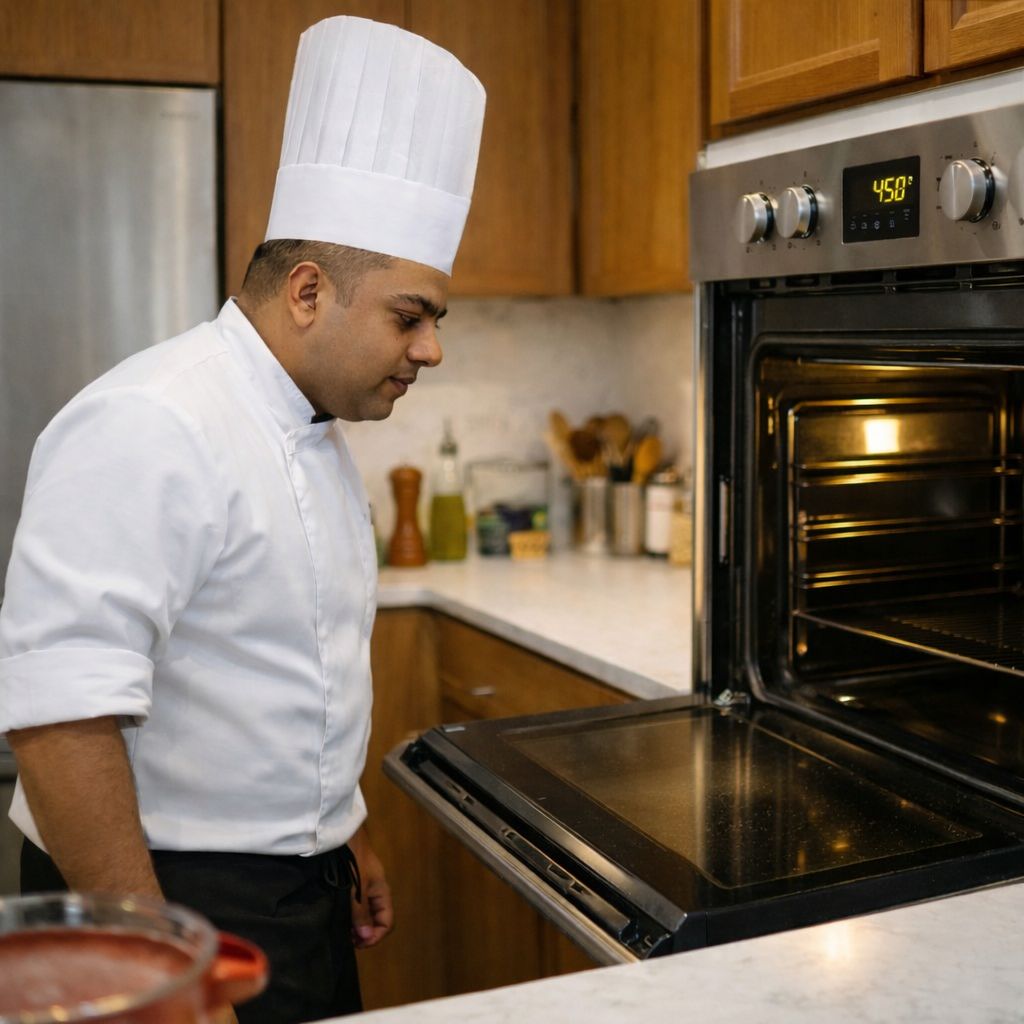
The first time I used my new oven, I meant to roast a tray of carrots. I pressed a button with what looked like a flame—and ended up grilling them instead. The tops scorched while the bottoms stayed raw. I stood there staring at the icon, realizing I had no idea what it actually meant.
That little mix-up taught me something big: knowing your oven symbols saves time and avoids disaster. You don’t want to learn the hard way with burned dinners or undercooked meat—especially when you’re hungry and tired after work. Trust me, those tiny icons carry a lot of power.
Short answer: Oven symbols matter because using the wrong one can ruin your food.
How Symbols Help You Cook Better
1. Precision = Better Texture
Each oven setting is designed for a purpose. Bake gives steady heat from below. Broil hits food from the top. Using the right symbol means your food comes out just how you want—crispy, soft, or golden.
2. Efficiency = Faster, Even Cooking
Ever baked cookies on a cold Chicago evening? If you use convection bake (the fan symbol), they cook faster and brown more evenly. It helps avoid hot spots and saves you time.
Quick tip: Convection mode (fan symbol) is your friend when cooking multiple trays.
3. Safety = Fewer Surprises
Some settings heat up fast—like broil or grill modes. If you don’t know what you’ve turned on, your dish can burn in minutes. Symbols help you avoid those sudden heat surges that ruin meals or, worse, become a fire risk.
Pro move: Always double-check the icon before hitting start—especially when using high heat.
📘 Common Oven Symbols Explained (With Real-Life Examples)
Oven symbols don’t have to be a mystery. After cooking in dozens of kitchens across the country, I’ve learned exactly what each icon means — and more importantly, when to actually use them. Here’s your no-guesswork guide.
🔥 Bake Symbol
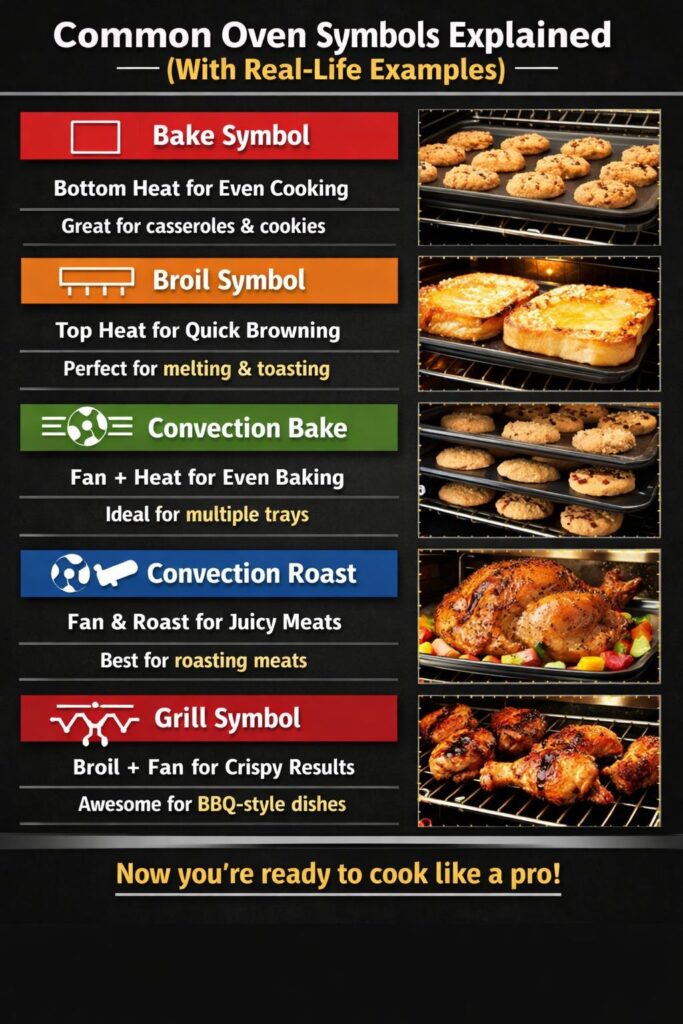
This icon usually looks like a square with a line along the bottom—it means the heat comes from below.
I use this setting for almost everything: roasting carrots, baking casseroles, cookies, even frozen lasagna. It’s great when you need slow, steady heat.
Quick answer: The bake symbol gives bottom heat—perfect for even cooking and soft textures.
Personal tip: Always let it preheat. I once skipped it and ended up with half-cooked brownies. Not my proudest moment.
🔥🔥 Broil Symbol
This one shows a line across the top—meaning the heat comes from above like a top-down fire.
I switch to broil when I want to melt cheese, crisp garlic bread, or get that charred finish on steak. It’s fast and intense—like a kitchen blowtorch.
Short answer: The broil symbol gives top heat. Use it for quick browning or melting.
Caution: Keep food in the middle rack or lower. Too close to the top and it’ll burn in seconds—I’ve scorched my fair share of nachos.
🔄 Convection Bake Symbol (Fan + Heat)
This icon usually shows a fan with lines above and below. It means your oven uses a fan to move the hot air evenly around.
I rely on this when baking multiple trays of cookies, especially during cold Chicago Decembers. It helps everything brown the same way—even on different racks.
Convection bake = fan + heat. Ideal for even baking and faster cook times.
Bonus: It can shave off 25°F and a few minutes from your usual baking time. Just watch things a little earlier than usual.
🌬️ Convection Roast or Fan Oven Symbol
This one looks like a fan next to a piece of meat—perfect for roasting proteins.
I use it for whole chickens, turkey legs, and roast veggies—especially in my Florida kitchen, where humidity can mess with texture. The moving air gives a crisp outside while keeping the inside juicy.
Quick guide: Convection roast is best for meat—crispy skin, juicy center.
Chef’s trick: Throw in root veggies on the same tray. Everything gets golden and gorgeous at once.
🔥🔁 Grill Symbol (Broil + Fan)
You’ll see a zigzag line with a fan under it. Think of this as a hybrid mode—broil heat with air circulation.
This is my go-to for crispy wings or indoor burgers. You get that grilled texture without heavy smoke or flare-ups. The fan keeps things from burning too fast.
Need-to-know: Grill with fan = broil heat + airflow. Great for BBQ-style results indoors.
Pro move: Line your pan with foil and use a rack. Fat drips below, and your food gets that restaurant-level crisp.
Oven Cleaning Symbols (Steam, Self-Clean, More)
Modern ovens can clean themselves—but only if you know which symbol to press. I’ll be honest: the first time I saw the water droplet icon, I thought it was for steam cooking. Turns out, it was for steam cleaning… and my lasagna mess baked on even harder while I waited. Let’s break these down, so you don’t make the same mistake.
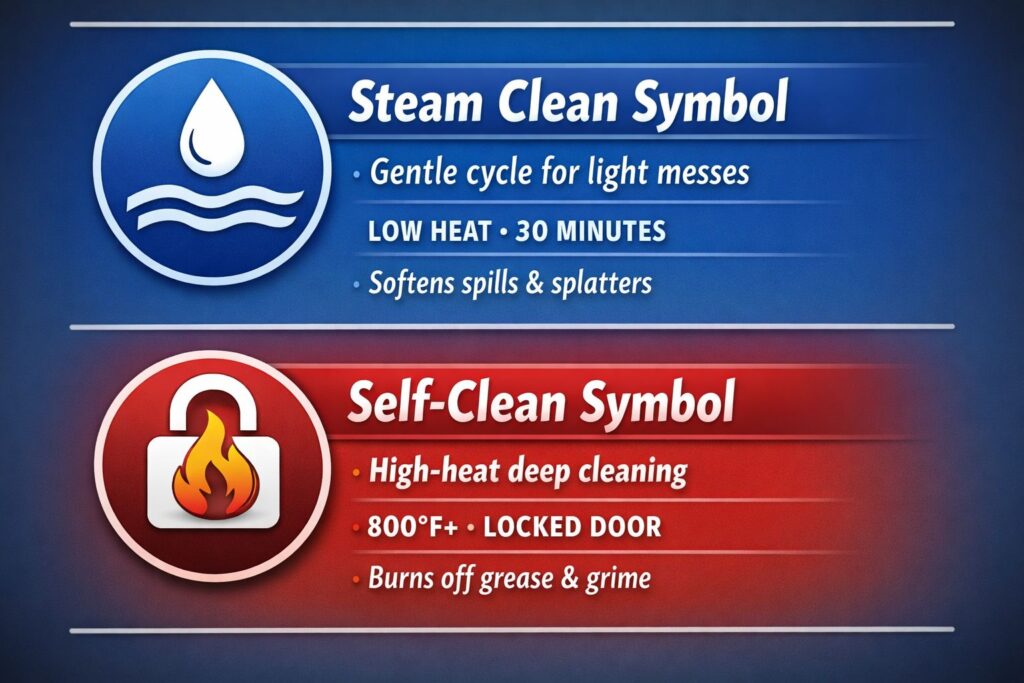
💧 Steam Clean Symbol
This one looks like a single water droplet or sometimes wavy lines. It’s a low-heat, short-cycle cleaning mode that uses water to soften spills and splatter.
I use steam clean after I’ve baked something messy but not greasy—like fruit cobbler or cheesy pasta bakes. Just add a bit of water to the bottom tray, press the symbol, and let it run for about 30 minutes.
Quick answer: The steam clean symbol means a gentle cycle for light messes—safe to use weekly.
Chef tip: Wipe it down right after the cycle ends—before it dries again. That’s when it’s easiest to clean.
🔥 Self-Clean Symbol
This one usually shows a padlock with a flame—and it means business. Self-clean mode cranks the oven up to 800°F+ to literally burn off grime and grease.
I run it only after roasting something fatty, like pork shoulder or a tray of bacon. The smell can get intense, so I always crack a window and turn on the fan. The door locks while it runs, and the whole process takes a few hours.
Need-to-know: The self-clean symbol triggers a high-heat cycle for deep cleaning—best for heavy messes.
Warning: Never leave pets or kids near it during the cycle. It gets really hot, and the smell can linger if you don’t air things out.
🎛️ Oven Control Panel Symbols Guide
From timers to child locks, here’s what those extra buttons really mean—before they confuse or surprise you like they did me.
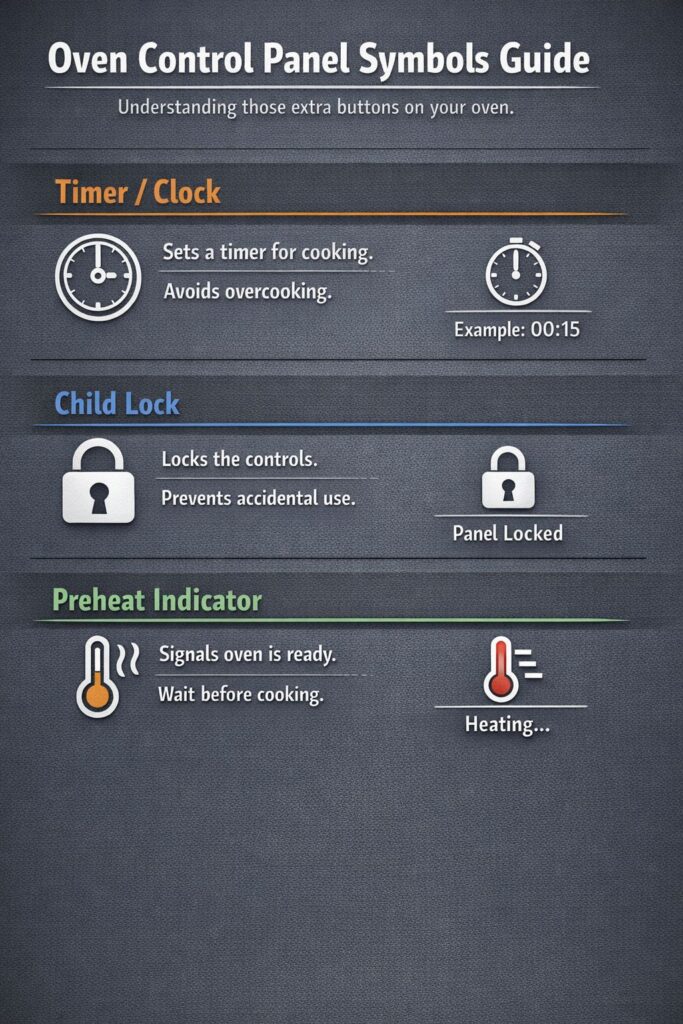
⏲️ Timer / Clock
This one seems obvious—until you forget to use it and end up with burnt cheese toast.
The timer symbol usually looks like a small clock or stopwatch. I use it all the time for broiling, where every minute matters. A few extra seconds under that top heat and your garlic bread goes from golden to charcoal.
Quick tip: The timer icon helps with precise cook times. Use it to avoid overcooking—especially with broil mode.
Real story: I once walked away from a bubbling tray of mac and cheese. Five minutes later, I came back to a scorched mess. Now I set the timer every time, even for short bursts.
🔒 Child Lock
This symbol looks like a small padlock. If you’ve got kids—or even nosy pets—this is your friend.
I didn’t know what it did until I accidentally turned it on one day. For hours, I thought my oven was broken. I couldn’t press any buttons or start a new cycle. Turns out, it locks the panel so nothing changes by mistake.
Need-to-know: Child lock disables the oven controls to keep things safe. Look for the padlock icon.
Pro tip: If your oven suddenly stops responding, check if the child lock is on. It’s saved me from ruined roasts and random setting changes more than once.
⏱️ Preheat Indicator
This one might be a small light, bar, or even a thermometer icon that disappears once the oven is hot.
I used to throw food in as soon as I heard the oven start humming. Big mistake. Cookies would spread too wide, roasts would cook uneven, and pizza crust stayed pale. Now, I wait for the preheat symbol to vanish or beep before putting anything in.
Short answer: The preheat icon tells you when your oven is ready—don’t skip it.
Chef insight: Preheating is the silent MVP of baking. It’s the difference between crispy and soggy, golden and gray.
📊 Quick Reference Chart: Oven Symbols and What They Mean
Sometimes, when I’m in a rush or juggling dinner with laundry, I don’t want to scroll through manuals or guess what each icon means. That’s why I made this quick chart. Whether you’re broiling, baking, or cleaning up after, these are the oven symbols I’ve used in real kitchens—and how to use them without the guesswork.
| Symbol | Meaning | Best Use | My Tip |
|---|---|---|---|
| 🔥 | Bake | Breads, casseroles | Let it preheat fully |
| 🔥🔥 | Broil | Cheese, steaks | Watch closely — heats fast |
| 🔄 | Convection Bake | Cookies, pies | Reduces hot spots for even browning |
| 🌬️ | Fan Roast | Chicken, turkey | Great for juicy meat, crisp skin |
| 💧 | Steam Clean | Light spills | Wipe right after cycle ends |
| 🔥🔁 | Grill with Fan | Wings, burgers | Gives BBQ-style results with less mess |
Quick answer: Use this oven symbol cheat sheet to match the icon with the job—no more guessing or burned dinners.
Chef’s note: I keep a printed version of this stuck inside my cabinet door. It’s saved me more than once when my hands were full and my brain was fried after a long day.
⚠️ Mistakes I Made With Oven Symbols (So You Don’t Have To)
Even after years of cooking, I still mess up. Oven symbols may look simple, but trust me—they can be sneaky. Here are a few mistakes I’ve made in real kitchens, so you don’t have to repeat them.
🎂 Using Broil for a Cake
This was a disaster I’ll never forget. I meant to bake a birthday cake, but I accidentally hit the broil icon. The top browned in minutes while the inside stayed gooey. I kept opening the door, hoping it would even out—it didn’t.
Quick answer: Broil heats from the top only. Never use it for baking.
Lesson learned: Always double-check your setting before you press start, especially when it’s something delicate like cake batter.
🔥 Ignoring the Preheat Light
I used to be impatient. I’d throw in chicken the moment I turned on the oven. The result? Uneven cooking—crispy on the outside, but still pink near the bone.
Kitchen truth: If the preheat light is still on, your oven isn’t ready yet.
Now I wait. No matter how hungry I am. It makes a world of difference—especially with meat and baked goods.
🍪 Misunderstanding Convection Bake
I thought convection would fix everything. So I used it for a batch of sugar cookies. Bad idea. The edges cooked faster than the middle, and they came out lopsided and dry.
Need-to-know: Convection bake = fan + circulating heat. Not always great for soft or delicate foods.
Tip: For cakes and cookies, I usually stick with standard bake unless the recipe says otherwise. Convection works best for roasting or big trays of food that need even browning.
🔒 Not Locking the Oven Mid-Dinner
Once, I was halfway through roasting dinner when I leaned on the oven door by mistake and hit a button. My settings reset. The oven turned off. I didn’t realize until 20 minutes later when I checked and the inside was cold.
Fast fix: Use the child lock symbol to prevent accidental shutdowns during long roasts.
Now it’s a habit. I turn it on when I’ve got something cooking for an hour or more—just in case.
How U.S. Brands Use Different Symbols (GE, Whirlpool, Frigidaire)
Not all ovens speak the same language—especially when it comes to symbols. I’ve used GE in a Chicago condo, Whirlpool in a Florida rental, and Frigidaire at a friend’s cabin up in Michigan. Each one had its own little quirks.
That’s when I realized: even if you know what “bake” or “broil” means, the symbol might look different depending on the brand.
Quick answer: Oven symbols vary by brand. Always check the manual—or keep one close like I do.
🔤 GE: Text + Symbols = No Guessing
GE is one of the friendliest brands when it comes to clarity. They don’t just give you icons—they add text right on the button.
Instead of just a fan symbol, you’ll see something like:
- “Convection Roast”
- “Bake”
- “Broil Hi/Lo”
It feels like your oven’s actually talking to you.
Why I like GE: It spells things out. No second-guessing when you’re tired and hungry after work.
My tip: If you’ve got a GE oven, take a minute to scroll through the modes—you’ll probably find some helpful options you didn’t know were there.
🌀 Whirlpool: Sleek but Subtle Symbols
Whirlpool ovens tend to use sleek, modern icons—but sometimes that comes at the cost of clarity. The fan symbol might look like a swirl or three curved lines, and the steam clean setting may not look like a droplet at all.
Short answer: Whirlpool’s fan icon = convection. Even if it looks like a spiral.
I used one while staying at a friend’s beach house in Florida. First night, I thought I was baking a frozen pizza, but I’d actually turned on convection roast. That crust got real crispy, real fast.
What I learned: Take 5 minutes to get to know your Whirlpool symbols. They’re minimal, but they do the job—once you know what you’re looking at.
🌊 Frigidaire: Wavy Lines and Water Confusion
Frigidaire likes to get fancy with cleaning modes. The steam clean symbol sometimes looks like wavy lines—which, if you’re like me, can easily be mistaken for a heat setting.
Quick tip: On Frigidaire ovens, wavy lines usually mean steam—not bake or roast.
One time, I was trying to warm up a tray of mac and cheese. I hit the wavy icon, thinking it was low bake. Ten minutes later, the oven was just steaming—not heating. I had to start over.
My fix: I now keep the manual taped inside a cabinet door. Every time I move into a new kitchen, it’s the first thing I check. You don’t want to guess when dinner’s on the line.
🔎 Bonus: Check the Model Number
Even within the same brand, older and newer models may use different symbols. If your buttons are worn off or unclear, search the model number online. Most brands offer a downloadable user manual.
Search “[Brand] + [Model Number] + Oven Manual” to find exact icon meanings.
I’ve done this for GE, Whirlpool, and even a random off-brand oven at an Airbnb once. It saved me from burning breakfast on vacation.
🧾 Chef’s Final Take
Oven symbols may seem small—but they make a big difference. And in U.S. kitchens, the brand you own can completely change the way your oven “talks” to you. Learn the language, tape up the manual, and trust your gut when something doesn’t feel right.
Because nothing’s worse than ruining a good meal just because of one little icon.
❓ FAQs About Oven Symbols
What does the fan oven symbol mean?
It means convection mode. That little fan icon tells you the oven is circulating hot air to cook food more evenly. I use it when baking multiple trays or roasting big batches—especially on cold days when I don’t want to wait forever.
Quick answer: Fan symbol = convection mode for faster, even cooking.
What’s the difference between bake and broil symbols?
Bake uses bottom heat (a line at the bottom), while broil blasts heat from the top (a line at the top). I bake for soft centers and even cooking. I broil when I want a fast crisp—like bubbly cheese or charred steak edges.
Short tip: Bake = slow and steady from below. Broil = intense top heat for browning fast.
What does the steam clean symbol look like?
It’s usually a droplet or a few wavy lines. The oven uses a low-temp steam cycle to loosen light messes. It’s not for greasy stuff—but works great after lasagna spills or fruit pies.
Quick read: Steam clean = droplet icon. Great for light, weekly cleanups.
How do I know if my oven is preheated?
Look for a light turning off, a beep, or even a display message like “Ready.” It varies by brand. I never put food in before that signal—learned the hard way with undercooked chicken once.
Instant answer: Your oven is preheated when the light goes off or it beeps. Wait for it—always.
Can I use convection bake for everything?
Not always. Convection bake is great for cookies, roasts, and pizzas—but not for delicate cakes. That fan can brown the edges too fast or make them rise unevenly. I stick to regular bake for fragile baked goods.
Real talk: Convection bake isn’t universal. Skip it for delicate treats like sponge cakes.

I’m Mossaraof, a trained chef and the founder of OvenInsights.com. I spent years cooking at Larrupin’ Cafe and in kitchens across Chicago and Seattle. Now I test kitchen gear for a living. I moved to North Acton, London, and I test every tool I write about. I use real meals and real heat. No brand deals. No shortcuts. I cover 12 kitchen types and hundreds of recipes. I believe this: the right tools matter as much as the recipe.